
June
29/06/2026
App: 5.88.1
Settings: 5.88.1
Improvements
🌐 API
Speed up formulas setting through API
Formulas can now be managed through the Formulas API, making it straightforward to automate fields without reimport the full table.
🧰 Data Factory
exchange-create-suggestions report now includes item identifiers
The report of the Data Factory task exchange-create-suggestions now exposes the suggested item identifiers making it straightforward to chain additional processing on suggested items without relying on internal IDs.
xml
<?xml version="1.0" encoding="UTF-8"?>
<Report task="exchange-create-suggestions" date="2026-04-17T15:01:56.944Z">
   <Log type="info" code="SUGGESTION_CREATED">
      <Metadata-Collection name="suggestionDefinition">
         <Metadata name="suggestionId">22107</Metadata>
         <Metadata name="toItemId">6590627</Metadata>
         <Metadata name="screenId">3971</Metadata>
         <Metadata name="publicationId">22293</Metadata>
         <Metadata name="hasCreatedItem">true</Metadata>
         <Metadata name="fromAccountId">4212</Metadata>
         <Metadata-Collection name="identifiers">
            <Metadata name="EAN">5028683116912</Metadata>
            <Metadata name="PRODUCT_CODE">978020137962</Metadata>
         </Metadata-Collection>
      </Metadata-Collection>
      <Message>The suggestion has been created successfully</Message>
   </Log>
   <Log type="info" code="PUBLICATION_RECEIVED">
      <Metadata-Collection name="publicationData">
         <Metadata name="publicationId">22293</Metadata>
         <Metadata name="status">RECEIVED</Metadata>
      </Metadata-Collection>
      <Message>Publication has been marked as received</Message>
   </Log>
</Report>💻 User Experience
Select multiple values in composite fields like in the grid
You can now select multiple cells across rows and columns in a composite field using Shift+Click or Ctrl+A, just like in the grid.
Copy-paste composite fields like a in the grid
You can now copy and paste multiple cells at once in a composite field. Fill or correct multiple data in seconds instead of cell by cell.
Delete composite field values like in the grid
You can now clear multiple cells at once in a composite field. No more deleting values one by one.
Undo composite field editions
Composite field lines addition and deletions can now be undone with Ctrl+Z, as well as any composite field values edtion.
Resolved issues
🌐 API
Formulas API now return standard messages
Formulas API 404 errors now return a clean, standard error message.
🧰 Data Factory
Automatic retry on transient network errors
Item import and refresh jobs now automatically recover from brief database interruptions, eliminating the need to manually relaunch failed jobs.
Fix table import with composite fields
Importing a table schema with the Data Factror []table-import-schema](/data-factory/references/tasks/table-import-schema/index.md) task containing composite fields now completes successfully.
🔢 Formula
Fix an issue with the Rules Engine Twig split function
The split syntax in Rules Engine Twig templates now produces the same result in both twig.1 and twig.2 engines, removing the need for workarounds when writing calculated field templates.
💻 User Experience
Editing composite fields now behaves reliably
Conditional Formatting validation messages in composite fields work as expected, so you can edit composed fields without friction.
All platform emails are now available in English
All automated emails sent by the platform now include English content, ensuring non-French-speaking users can understand what is expected of them.
Composite fields display correctly in detail view on shared tables
Composite fields in detail view now show their data correctly on shared tables, so you can edit them without switching to grid view.
22/06/2026
App: 5.87.0
Settings: 5.87.0
Resolved issues
🧰 Data Factory
Data Factory job execution statuses now reflect real state
Data Factory job execution statuses now reliably reflect their actual state, even when jobs produce large output volumes.
17/06/2026
App: 5.87.0
Settings: 5.87.0
Improvements
🎨 Conditional Formatting
Conditional formatting messages now show only what triggered the rule
When a field is required based on another field's value, the message now shows only the option that triggered it - no more unreadable lists.
🧰 Data Factory
Use business keys in Data Factory data-item-find task
You can now pass tableKey and partitionKey directly to the Data Factory data-item-find task, removing the need to chain multiple tasks just to resolve a partition id.
More details on XSLT transformation errors
XSLT transformation failures now expose the actual error message in the job details, so you can easily diagnose issues.
Control pagination on Data Factory data-*-find tasks
You can now set a custom pageSize on any Data Factory data-*-find tasks to fine-tune how data is retrieved, without modifying the job definition.
💻 User Experience
Search Composite sub-fields in the detail view
You can now search for any field in the detail view, including fields nested inside composite fields - the result shows the full path (COMPOSITE > SUB-FIELD) so you can find and navigate to the right field instantly.
Resolved issues
🧰 Data Factory
Job execution status now accurately reflects actual outcomes
Completed and failed jobs no longer appear as "In progress" in the Actions list.
10/06/2026
Visual Studio Code Extension 2.0.0
Visual Studio Code Extension
New Workflow Visualization feature
The Product-Live VS Code extension now includes a Workflow Visualization feature, accessible via the Visualize Workflow command. This interactive canvas renders your job structure as a visual graph, displaying tasks, control flow (loops, switches, forks), and their dependencies. You can click on any task node to inspect its input parameters, description, and navigate directly to its definition in your job.json file.
Improved XSLT Editor experience
The XSLT transformation experience has been enhanced with output format selection (XML, JSON, XSLT) and a detailed execution report including duration, file sizes and CPU/memory resource usage. This helps identify performance bottlenecks when designing XSLT transformations for large files.
Improved Job Diagnostics and validation
The extension now provides more accurate real-time diagnostics for your job.json files, with enhanced validation rules covering 65+ task types. Errors and warnings are displayed directly in the VS Code Problems panel, helping you catch configuration issues before packaging and uploading your jobs.
Configurable Package Naming strategy
You can now choose how the packaged ZIP file is named via the productlive.packageNaming setting. Three strategies are available:
key-timestamp(default):my_job-2026_04_28T14_30_00.job.zip- each package creates a new filekey:my_job.job.zip- overwrites the previous packagekey-date:my_job-2026-04-28.job.zip- one package per day
The packaging feedback has also been improved with clear success and failure messages. You can now also package a job directly with Ctrl+Alt+P (Cmd+Alt+P on Mac) when a job.json file is open.
08/06/2026
App: 5.86.2
Settings: 5.86.2
Improvements
🌐 API
Items API now returns accurate HTTP status codes
Non-blocking warnings no longer trigger an HTTP 400 error, you can reliably chain API calls based on the response code without inspecting the full report.
💻 User Experience
Undo accidental deletions in composite fields
You can now undo the deletion of a composite field cell or row with Ctrl+Z, preventing accidental data loss.
Search items across all partitions by any identifier
When searching items across all partitions, you can now select any identifier available in your screens, and copy unfound identifiers in one click from the warning message.
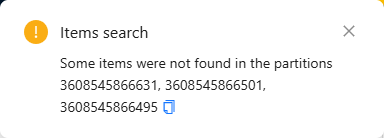
Feature in alpha phase
The Find items across all partitions is in phase. You can contact the Product-Live team at contact@product-live.com if you want more details and get an early access.
Easier navigation inside composite fields
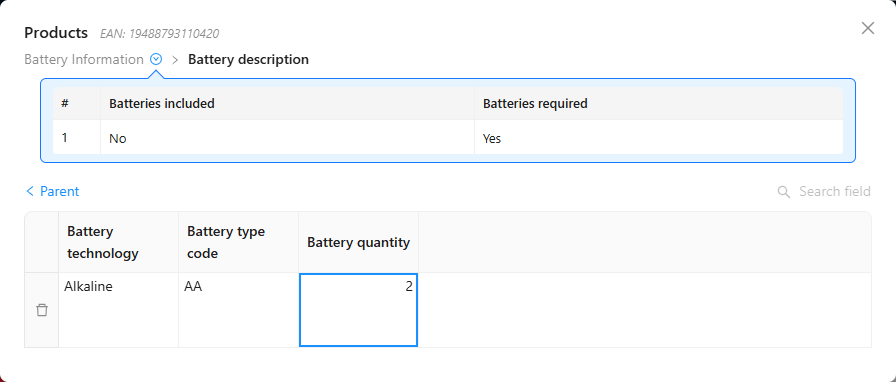
You can now better understand where you are in your composite fields, giving you the context you need to complete your data faster.
Formula execution errors now display in the UI
When a Twig formula fails during cell editing, the error message is now visible in the interface enabling you to better understand what happened

Improve Suggestions visibility
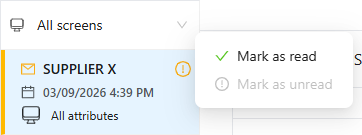
You can now more easily mark suggestions as read or unread. This feature helps you efficiently update your products while keeping track of pending changes that still need review before applying them.
Simplify Suggestions handling
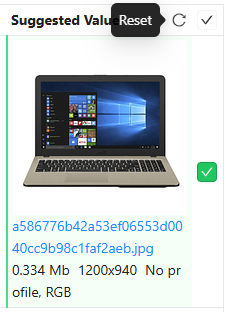
You can now conveniently reset selected fields to their default values, allowing you to start fresh from a clean slate if you encounter any issues.
Resolved issues
🎨 Conditional Formatting
Conditional Formatting rules on composite fields now work correctly
Conditions referencing a composite field's sub-field are now correctly imported and evaluated - compliance messages display as expected.
💻 User Experience
Execute actions - no more misleading selection warning
Executing actions that does not use a item selection no longer shows a "X lines will be exported" warning, and items selected during grid loading is now correctly used when launching jobs.
🧰 Data Factory
Category keys with leading or trailing spaces are now rejected on import
Importing a taxonomy file containing category keys with heading or trainling spaces now returns an explicit error in the report - preventing silent data corruption on existing items.
Fix logLevel parameter on Data Factory table-import-items task
The logLevel parameter is now correctly applied on the Data Factory table-import-items task, so you only see the log messages that matter.
01/06/2026
App: 5.85.1
Settings: 5.85.1